Test an iOS app on a real iPhone from your Mac
Put a build on your iPhone, run XCUITest there, then run saved checks on it with mobster test --device. Real commands, real output, and what a phone can't do.
A simulator runs your app on your Mac’s CPU, with your Mac’s memory and a keyboard that always works. A phone doesn’t. The bugs that ship are often the ones a simulator can’t show you: a screen that hitches on an A15, a sheet that sits under the keyboard, a build whose signing or entitlements are wrong, a paywall that loads real sandbox prices. This guide takes you from a cable to a passing test on a real iPhone, first with Apple’s tools and then with Mobster’s.
Prepare the iPhone
- Plug the iPhone into your Mac, unlock it and tap Trust when it asks.
- Turn on Developer Mode: Settings › Privacy & Security › Developer Mode. Turn it on, tap Restart, and confirm after the restart. The switch appears only once Xcode has seen the phone.
- In Xcode, open Settings › Accounts and sign in with your Apple Account. A free account works.
- Open your project, select the app target, and under Signing & Capabilities choose your team. Give the bundle ID a name only you use, such as
com.yourname.yourapp.dev.
With a free account the signature lasts 7 days. After that the app won’t open until you build and install it again. Apple’s guide covers the same steps in Xcode’s own screens.
Build and install from the terminal
Run these from your project’s folder. xcrun devicectl and xcrun xctrace ship with Xcode.
xcrun xctrace list devicesYour phone’s line ends with its UDID: Test iPhone (26.0.1) (<UDID>). Use it for both xcodebuild and devicectl. xcrun devicectl list devices shows a different ID, CoreDevice’s, which xcodebuild rejects. Then build for the phone, install and launch:
xcodebuild -scheme YourApp \ -destination 'platform=iOS,id=<UDID>' \ -derivedDataPath build -allowProvisioningUpdates buildxcrun devicectl device install app --device <UDID> \ build/--console streams the app’s output into your terminal until you press ctrl+c. That is the quickest way to see a crash message from a phone you can’t attach a debugger to.
Run XCUITest on the phone
The same destination runs your UI tests:
xcodebuild test -scheme YourApp -only-testing:YourAppUITests \ -destination 'platform=iOS,id=<UDID>' -allowProvisioningUpdatesXCUITest runs inside a test runner app that Xcode signs and installs next to yours, so the phone must stay unlocked for the whole run. If a system alert appears, such as a notification permission, register an addUIInterruptionMonitor handler or the test stalls on it.
Run saved checks on the phone with Mobster
A Mobster check is a YAML file that says what must be true of a screen. Mobster runs the flow, then decides the verdict from the app’s accessibility tree, never from a model. The same file runs on a simulator and on your iPhone.
# .mobster/Mobster for Mac sets the phone up for you: it builds and signs WebDriverAgent, the open-source XCTest runner that reads the screen, and walks you through Developer Mode with a picture of each step.
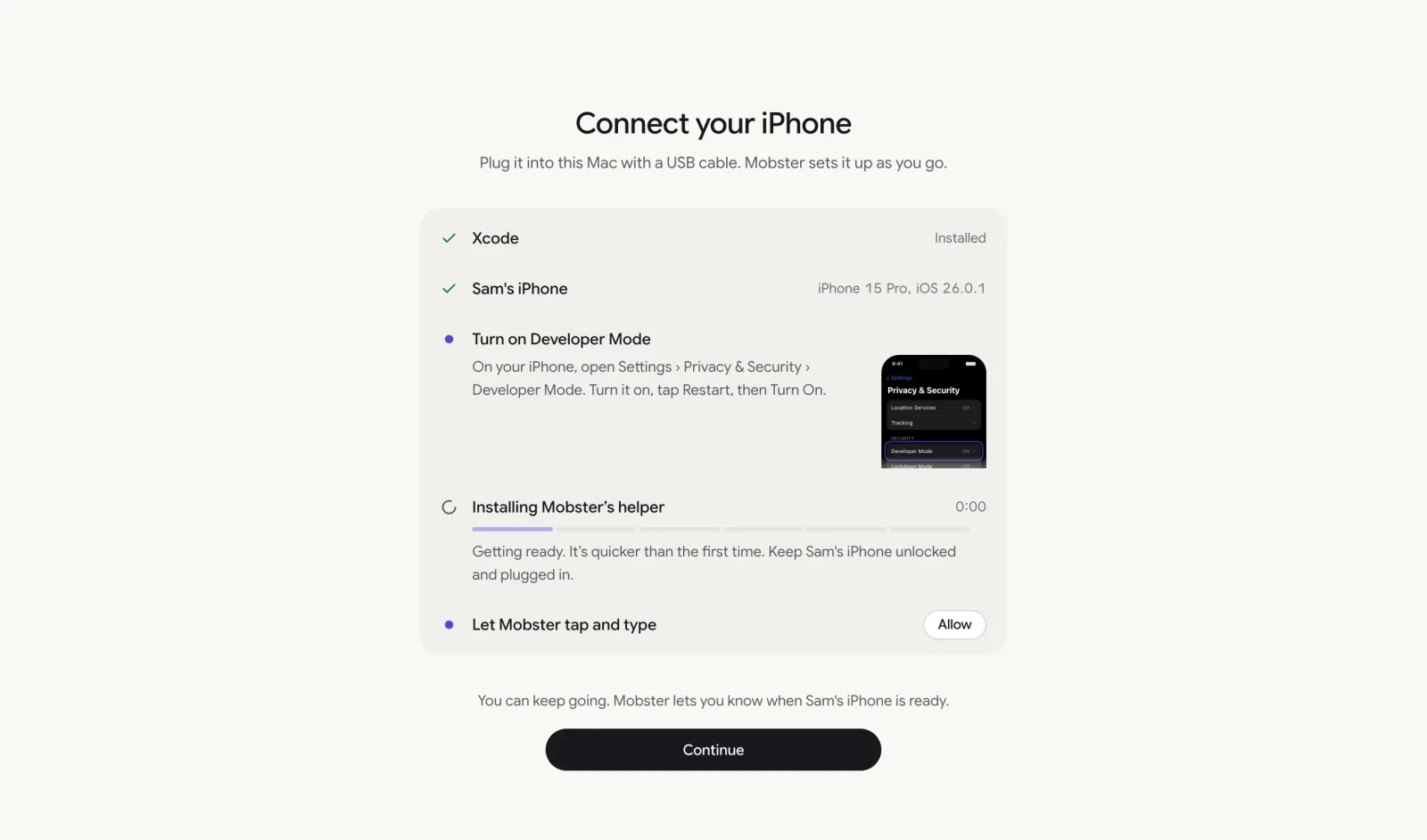
Mobster for Mac sets up the phone.
Then list what Mobster can drive and run the checks on the phone. mobster devices prints one row per device, simulators included (the name here is a stand-in for yours):
$ mobster devices Name Kind State Details Test iPhone iPhone Ready iPhone 15 Pro, iOS 26.0.1mobster test --device "Test iPhone"Mobster installs the check’s app.path when it’s an .ipa or a device build, or uses the build already on the phone when devicectl lists it as built by a developer. It prints a line per check, the totals and where the reports are. Example output:
✓ passed Lesson complete awards XP and the streak goes up on iPhone 15 Pro, iOS 26.0.1✗ failed The daily reminder stays on after a relaunch on iPhone 15 Pro, iOS 26.0.1 1 of 1 expectations failed1 passed, 1 failed in 1 min 12 s, $0.04Report .mobster/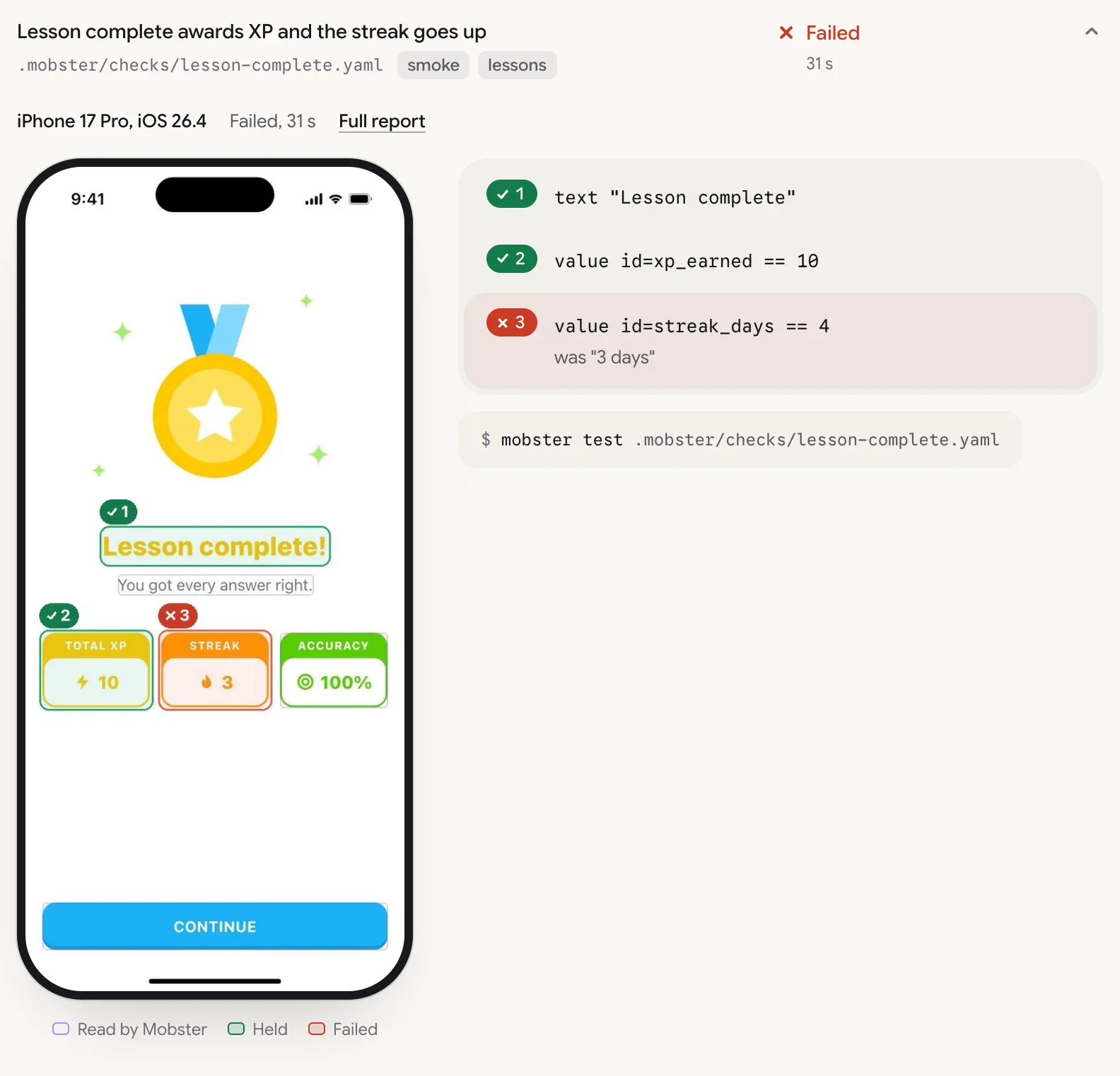
A failed check in the report, from a simulator run. The streak is outlined, and the expectation says what it found: was "3 days".
The exit code is the verdict: 0 passed, 1 failed, 2 needs review, 3 couldn’t run. A check with steps runs Smart on your Claude or OpenAI key until it passes once. After that it replays the recorded steps with no model call. On 17 October 2026, on an iPhone 15 Pro (iOS 26.0.1, USB), a two-step check that opens a paywall from Settings in a test app took 17.7 s median fresh and 10.3 s replayed over 5 runs each, at $0.017 and $0 a run. A launch-only check, with no steps, never calls a model.
What Mobster does and doesn’t do on your phone
- It drives only your own app, and only a build you put there. An App Store app is refused: “Mobster tests your own apps on your iPhone. Instagram is from the App Store.”
- Smart steps stay in your app. If one opens another app, the check stops.
- It never clears the app’s data on a phone. Smart steps never send, buy, post or delete there: every commit is refused.
- A phone is reached only with
--deviceon the command line. A check file can’t name one. - One check runs at a time on a phone.
--device alluses every ready phone, and--spreadgives each check to whichever is free. - It can’t pass Face ID or your passcode. Keep the phone unlocked.
- Real iPhones need a Mobster plan. Simulators don’t.
Which one to use
XCUITest is the right tool when your tests live in your repository, run in Xcode and need to reach inside your app’s process. Mobster is the right tool when you want checks as files that a person or an agent can write in plain English, the same check on simulators and phones, and a report with the frame that proves each verdict. Maestro vs XCUITest vs Mobster sets the three side by side.
Download Mobster for Mac. It sets up your iPhone for you and runs mobster test on it: $12 a month, $99 a year, or $149 once, every phone included.
Device setup has the same steps for the mobster command on its own.
Questions
Do I need a paid Apple Developer account to test on my own iPhone?
No. Xcode signs a development build with a free Apple Account. The signature lasts 7 days, after which you build and install again.
Can I test an App Store app on a real iPhone with Mobster?
No. On a real iPhone a check drives only your own app, and only a build you put there from Xcode, an .ipa or TestFlight. An App Store app is refused with a message that says why.
Do I need a cable?
Use one for the first setup. Xcode can then connect to the phone over your network, and Mobster can reach a phone over Wi-Fi too.
Sources
We read each of these on 17 October 2026. Reviewed by Mobster team on . Corrections are welcome at the GitHub repo.