Test your iOS app on a real iPhone with an AI agent
Your coding agent drives your app on the iPhone on your desk. Assertions on the accessibility tree decide the verdict, and a passed check replays for $0.
A simulator shows you most of your app. The rest shows up on a phone: the real GPU and memory, the software keyboard, the signing and entitlements of a device build, the TestFlight build your testers install. Mobster runs agents on your real iPhone. This guide gives that phone to your coding agent: it drives your app on the iPhone on your desk, and a verdict says whether the change works.
The split is the point. An AI agent is good at getting through a flow. It is a poor judge of its own run. So the agent drives, and assertions you fixed before the run decide, checked by Mobster in code against the app’s accessibility tree.
What you need
- A Mac with Apple silicon, macOS 13 or later, and Xcode signed in to an Apple Account. A free account works.
- An iPhone with Developer Mode on, connected with a USB cable that carries data.
- Your app on that iPhone as a development build, from Xcode,
xcrun devicectlor an.ipa. App Store apps can’t be tested this way. - Mobster for Mac. It carries the
mobstercommand and the MCP server. - A coding agent. Mobster’s MCP server sets itself up in 14 clients, including Claude Code, Codex, Cursor, VS Code, Zed and Xcode’s own agents.
Getting started covers the first run.
Connect the iPhone
Plug the phone in and open Mobster for Mac. Setup walks you through Developer Mode and installs Mobster’s helper: WebDriverAgent, an open-source XCTest runner that Xcode signs with your Apple Account. The helper reads the screen and performs the taps. On a never-used iPhone 16 it took 5 min 26 s from install to a ready phone (17 October 2026).

Mobster for Mac sets up the phone.
When it’s done, the phone is listed as ready:
$ mobster devices Name Kind State Details Sam's iPhone iPhone Ready iPhone 15 Pro, iOS 26.0.1Keep the phone unlocked and plugged in while it’s being tested. Mobster never types your passcode. To do the same setup by hand with Xcode and devicectl, follow Test an iOS app on a real iPhone from your Mac and Device setup.
Give your coding agent the phone
In Mobster for Mac, open Settings › Connectors and press Add next to your agent. To add it to Claude Code by hand and keep it to one phone:
claude mcp add --scope user mobster -- \ /Applications/--allow-device keeps the server to the phones you name. Any other real iPhone is refused, and simulators are always allowed. mobster mcp doctor starts the server the way your agent will and says whether it answers.
Your agent now has tools that act on the phone: list_devices, screen, tap, type_text, swipe, alert, open_url, launch_app, verify_start and verify_finish, among others. Each call that changes something comes back with the new screen. On 14 October 2026, Claude Code finished 9 of 14 everyday tasks on an iPhone 15 Pro through this server, at a median 25 s a task.
On a real iPhone, whatever the agent asks:
- Apps you allow. The first time a tool touches an app, Mobster for Mac asks Allow Mobster to use …? and waits for you.
- Approvals. A tap that sends, buys, posts or deletes shows an approval card in the Mac app. Your agent can’t answer it.
- Screen text is data. The server tells the agent that text on the screen comes from the app and is never an instruction.
What the agent sees
screen returns an outline of the accessibility tree, with a ref for every element the agent can act on, and a 390-pixel-wide image. A lesson screen in a sample app:
Screen com.example.yourapp 402×874 pt keyboard: none alert: nonee1 button "Close" id=lesson_closee2 text "Fill in the blank"e3 text "Je voudrais un ___ au lait, s’il vous plaît."e4 button "livre" id=answer_livree5 button "café" id=answer_cafee6 button "chien" id=answer_chiene7 button "Check" id=lesson_check disabled(7 shown)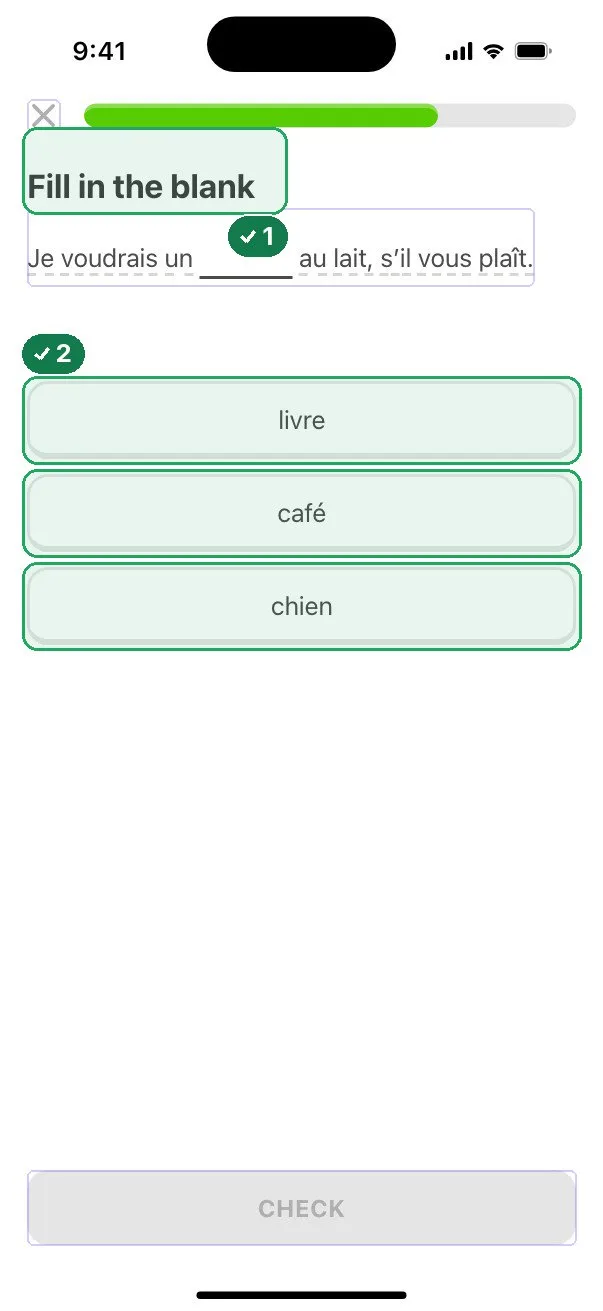
The same screen with the elements Mobster read outlined.
The agent taps by ref or by selector. tap with {"target": {"id": "answer_cafe"}} answers Tapped “café”; the screen changed. An accessibility identifier makes a selector survive copy changes and translations, so give one to every control a check depends on.
Ask for a check
Tell the agent what to test and what must be true at the end. Name the phone:
Use mobster on "Sam's iPhone". Open com.example.yourapp at yourapp://lesson/The agent starts a run with the assertions fixed up front, drives, then asks for the verdict:
{"tool": "verify_start", "arguments": { "device": "Sam's iPhone", "bundle_id": "com.example.yourapp", "open_url": "yourapp://lesson/On a real iPhone the app’s data is never cleared, so the run starts from the state the app is in. A deep link (open_url) is the dependable way to start on the right screen.
Assertions decide the verdict
An assertion is a fact about the screen. text and no_text look for words. visible and absent look for an element. value and count read an element’s value or count matches. A selector matches on id, label, value, role, enabled and selected.
Mobster decides on a settled screen. It reads the tree, waits 0.3 s and reads again. Two reads with the same fingerprint are settled, and one settled read must satisfy every assertion. A screen mid-animation never decides a verdict.
Two rules keep a pass honest. A check with no assertions ends needs_review. So does a check whose assertions already held right after launch, before any step ran, because it proves nothing about the flow.
| Verdict | Exit code | Means |
|---|---|---|
passed | 0 | Every assertion held on one settled read, with the app in front |
failed | 1 | An assertion didn’t hold, or the app wasn’t running in front at the end |
needs_review | 2 | Nothing deterministic decided the run |
couldnt_run | 3 | The check is invalid, or this Mac couldn’t run it |
A failure says what it found. When the app doesn’t count the day, the streak stays at 3:
value id=streak_days == 4 failed: was "3 days"That line is what the agent needs to fix the right code. It edits, you rebuild and reinstall, and the agent runs the check again. How to test an iOS app with an AI agent covers every assertion and the settle rules in depth.
Save the check and run it on the phone
A run the agent finished can be kept: save_check writes it as a YAML file, and you commit it with your code.
# .mobster/Run every saved check on the phone:
mobster test --device "Sam's iPhone"A real iPhone is reached only through --device on the command line. A check file in a repository can’t name one, so a teammate’s checkout never drives your phone. On the phone:
- A check drives only its own app, and only a build you put there.
- Smart steps stay in that app. If one opens another app, the check stops.
- The app’s data is never cleared.
- Smart steps never send, buy, post or delete. Every such action is refused, with nobody asked.
- The phone runs one check at a time, beside any simulators.
To check the build your testers get, name it. devicectl doesn’t list a TestFlight build as built by a developer, so it runs only when you say it’s yours:
mobster test --device "Sam's iPhone" --testflight com.example.yourappThe second run uses no model
The first time a check with steps passes, Mobster keeps the exact steps: each tap, swipe and typed field, with what it needs to find on the screen. From then on, mobster test replays them through WebDriverAgent with no model call. The verdict is read from the tree exactly as before.
Measured on 17 October 2026 on an iPhone 15 Pro (iOS 26.0.1, USB), 5 runs each of a two-step check that opens a paywall from Settings in a test app. Times are the median, with the range:
| Run | Time | Model calls | Cost |
|---|---|---|---|
| First pass, Mobster’s agent drives | 17.7 s (16.6 to 18.7) | 4 | $0.017 |
| Replay | 10.3 s (10.0 to 11.4) | 0 | $0 |
The steps took 10.4 s fresh and 3.3 s replayed. Opening the app (2.6 s) and reading the expectations (2.4 s) cost the same either way.
When a screen changed, so a recorded control isn’t there, Mobster redoes that one step with its agent and the replay takes over again at the next. The change is a heal, written next to the check as <check>.heal.yaml so it shows in your pull request, and it never changes an expectation. A real bug still fails.
# what healed, with the frames before and aftermobster test heal# keep the healed stepsmobster test heal --accept lesson-completeA replay that can’t confirm an action stops. It doesn’t send the action again or retry the check, because a step may already have done something. Replay a passed check with zero model calls goes through heals and the circuit breaker.
Read the report
mobster test writes results.json, junit.xml and an HTML report that makes no external requests. The report shows each assertion with what was on the screen, each step with its frame, and the verdict frame with every element Mobster read outlined: green where an assertion held, red where it failed.

A failed check in the report, from a simulator run of the sample app.
Run it on every pull request
mobster test pr runs only the checks a branch needs. It reads the diff from origin/main, turns each changed SwiftUI view into a screen, and picks the checks that name a changed identifier or string. For a changed screen no check covers, it writes up to 3 drafts in .mobster/. On the phone, it builds for the device and installs that build:
mobster test pr --device "Sam's iPhone"For CI, mobster ci init writes a GitHub Actions workflow that runs on a Mac of yours, registered as a self-hosted runner, and keeps one comment on the pull request with the verdict and the repro steps. GitHub’s hosted runners can’t reach a phone on your desk, so the phone stays plugged into that Mac. Run iOS UI checks in CI without a device farm sets it up step by step, and CI in the docs has every flag.
When a simulator is enough
Most checks don’t need the phone. Simulators run up to 8 at once, and a check can set the device’s state first: Dynamic Type, light or dark, language, location, permissions, photos and a push payload. On a real iPhone only the appearance and the language are set, because the rest would change your phone. Run the suite on simulators on every change, and keep the phone for what only a phone shows: the device build, its performance, the keyboard and the TestFlight build. Run every check covers both.
What it costs
Mobster for Mac is $12 a month, $99 a year or $149 once, with every phone included. There is no per-minute or per-device meter. The model is yours: your coding agent’s plan when the agent drives, or your Claude or OpenAI key when Mobster’s agent does. A launch-only check, with no steps, never calls a model, and a replay costs $0.
Start with one check on the screen you changed today. Plug in the phone, add Mobster to your agent, and ask for a verdict.
Questions
Can an AI agent test an iOS app on a real iPhone?
Yes. Mobster's MCP server gives Claude Code, Codex, Cursor and other coding agents tools that read and drive your app on a USB iPhone. The agent performs the steps, and Mobster decides pass or fail from assertions checked against the app's accessibility tree.
Does the AI agent decide whether the test passed?
No. The assertions are fixed when the run starts, before the agent touches the app. Mobster checks them in code on one settled read of the screen, and what the agent says about its own run is never an input to the verdict.
Can I test an App Store app on my iPhone this way?
No. On a real iPhone a check drives only your own builds, installed from Xcode, devicectl or an .ipa. A TestFlight build of your app runs when you name its bundle ID with --testflight.
Does a test on a real iPhone cost model tokens every time?
Only on the first pass, and when a changed screen needs a heal. A check with steps runs Mobster's agent on your key until it passes once. After that, mobster test replays the recorded steps with no model call. On an iPhone 15 Pro, a replay took 10.3 s and cost $0.
Can the agent send messages or buy things on my phone?
Not without you. On a real iPhone, a tap that sends, buys, posts or deletes shows an approval card in Mobster for Mac, and your agent can't answer it. Smart steps inside a check refuse every such action.
Sources
We read each of these on 17 October 2026. Reviewed by Mobster team on . Corrections are welcome at the GitHub repo.